
Terminology
Some basic explainers for some of the terms used.used, listed alphabetically.
Client Side / Server Side
Client Side is whatever the player installs on their computer - some mods like font replacers are usually client side only, meaning only you would see the changes (your computer!). Server Side mods usually need to be installed on both Server and Clients. Sites like Modrinth will say whether a mod is intended for Servers or Clients.
Game Modes
Different gameplay modes you can switch between. Switching modes is usually restricted to players with admin control, but we want everyone to pick how they play in our server. You can use slash commands to switch modes, or you can hit F4 to quickly switch between Creative and Survival.
Creative Mode - Creative Mode gives you access to all the blocks available in the game including spawn eggs for passive and hostile mobs (like a zombie or a sea turtle). We're playing in Peaceful mode so hostile mobs probably won't actually spawn. Every item or block you pick is effectively unlimited and this mode removes pretty much all challenge from the game.
It's very easy to build things in Creative Mode, but equally easy to break things by accident, especially chests or other containers. If you pop a chest, all the contents will spill out - do your best to put things back if this happens!
Survival Mode - The default Minecraft experience, minus the danger. There is fall damage but it's basically negligible unless you fall from really high up (like into a ravine or something). You can die but there's no actual loss and no need to worry about losing items or experience on death.
Block placement is as expected, you will need to have specific blocks in your inventory to build with (either legitimate or through "cheating"), and tool strength and type matters for clearing things out of the way - eg, iron tools for mining ores, shovels or axes for dirt and trees.
Spectator Mode - I think you can just follow another player and see what they're doing
Adventure Mode - Not sure what this is about, not applicable for us. In Adventure Mode, you can't break or place blocks, or do anything that could be considered griefing.
Griefing
Intentionally antagonistic behavior in a multiplayer game. In a Minecraft context, this means things like stealing items from other players, breaking people's stuff or fucking around with preexisting buildings, or otherwise being a dick. This is a much bigger deal in games where there's permadeath or actual consequences for dying, like losing your inventory.
We have a lot of bulk editing mods in this server meaning it's much easier to accidentally fuck up other people's stuff without intending to do so. We're currently looking into ways to protect areas to prevent any catastrophic losses of builds.
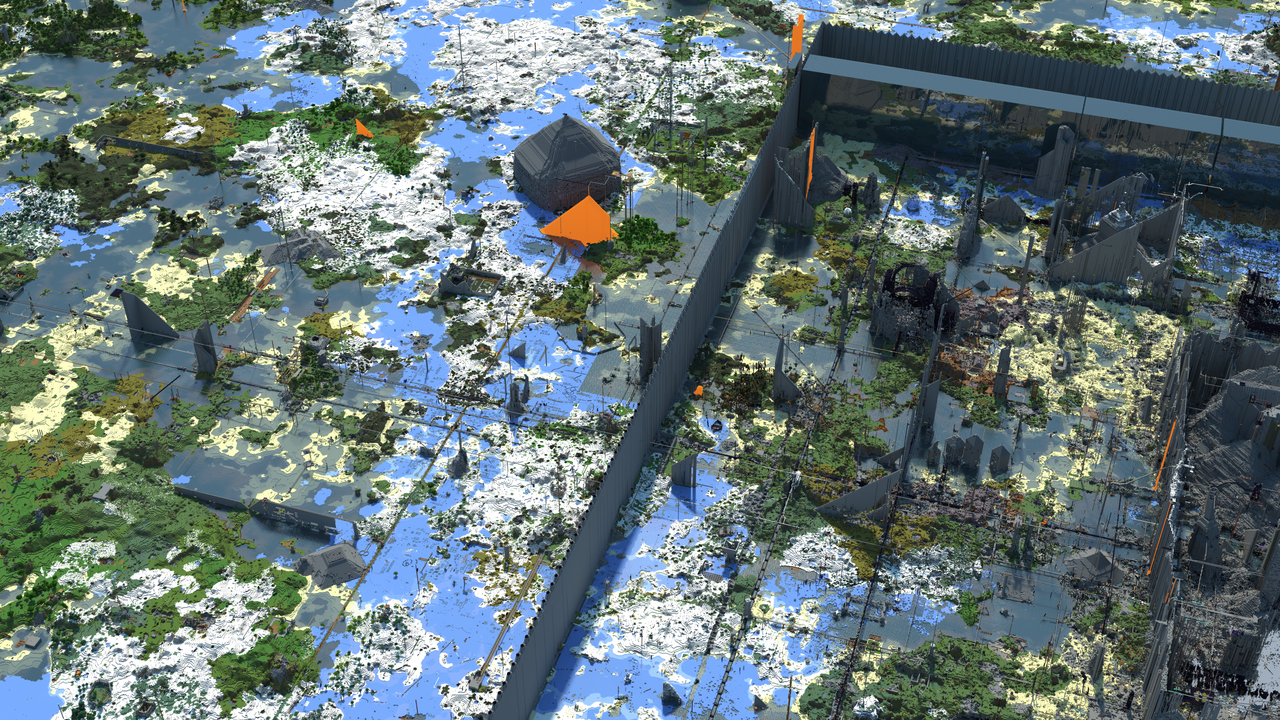
Below is an example of griefing in Minecraft from Wikipedia; the terrain looks incredibly fucked up.
Mods
Anything that modifies the game from its vanilla state that is more complex than texture or audio swaps. Mods can be as simple as adding new block types (like furniture or new ores) and as complex as adding realistic physics to the game or porting the entirety of the Pokemon series and its game mechanics.
Modpack
a Modpack is a zip containing the mods as well as info about which version of Minecraft and Mod Loader to install. Installed via drag and drop with a launcher like Prism Launcher. Modpacks are a curated collection of mods intended to be used together, and contain all necessary dependencies needed to play.
Resource Pack
Resource Packs allow changes to textures, models, music & sounds, splash screens, fonts, etc without any code modification. Resource Packs are also in .zip format and installed via drag and drop, or installed directly through a launcher. Previously referred to as texture packs, renamed when more asset types became supported.
Slash Commands
Commands that can manipulate the game state, change your position in the world, modify your inventory, and more; also known as console commands in other games. Read more about specific commands here!
Shader Pack
Shader Packs are mods that enhance the visuals of the game. They can add things like volumetric clouds, waves and caustics in the water, bloomy lighting, ray traced lighting effects, and more. Shader packs are client side so every player might have a completely different visual experience within the same server. Some shaders are more like a vanilla+ experience, while some make it feel like totally different game, similar to playing a game with ReShade.
There's a range of options available for shaders, from cartoonish or fantasy, to hyper realism, and some are specifically tuned for low-end computers with onboard graphics. Some example shaders to check out: Aurora Fantasy, Complementary-Unbound, Complementary-Reimagined, Rethinking Voxels, BSL Shaders, and Sildur's Vibrant Shaders.
We picked Solas Shader to be the default for the server because it works well with the mod loadout at a modest performance cost. You're free to use whatever shaders you want if you're not into this look. You can also adjust parameters to improve performance or visuals as needed.