
Connecting to the server
Since this is a private server that I don't want to directly expose to the internet, you will need to install a program that will let you actually reach the server.
I am using something called Tailscale for this. It creates a private virtual network that lets our computers talk directly to each other. If you have used Hamachi before, it is like that. For what we're doing, it's free to use.
| 💁🏻♀️ℹ️ Note: you should only install this sort of thing if you trust the person who is asking for it; it bypasses some typical security measures by letting our computers directly contact each other. |
- Create an account, https://login.tailscale.com/start
- You'll need to use a google, microsoft, github, or apple account to sign in. Keep track of which one you use for this.
- As soon as you have an account, ask me for a tailscale invite link. This is required so that you can 'see' my pc
- Download and run the installer https://tailscale.com/download
- You should now have a tailscale icon in your system tray, make sure you are signed in
- Click the invite link I hopefully sent back to you
- You should be able to right click on the tailscale icon, go into 'network devices', and see my name. Inside of that should be the server (currently this is viv-pc.cow-bebop.ts.net, but subject to change (and if it does change, I will need to give you a new share link))
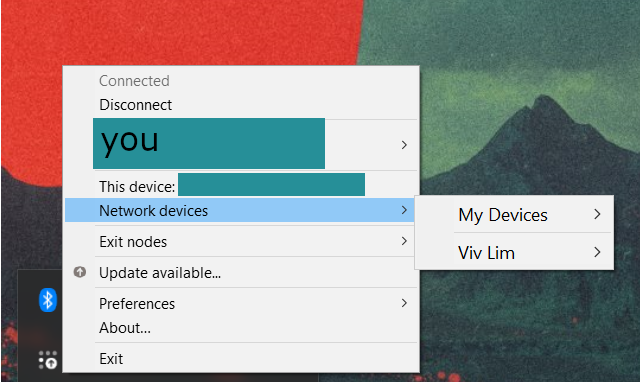

If you see that, you should be able to connect to the server (assuming that it is up)